Answer tickets faster,
right where you work.
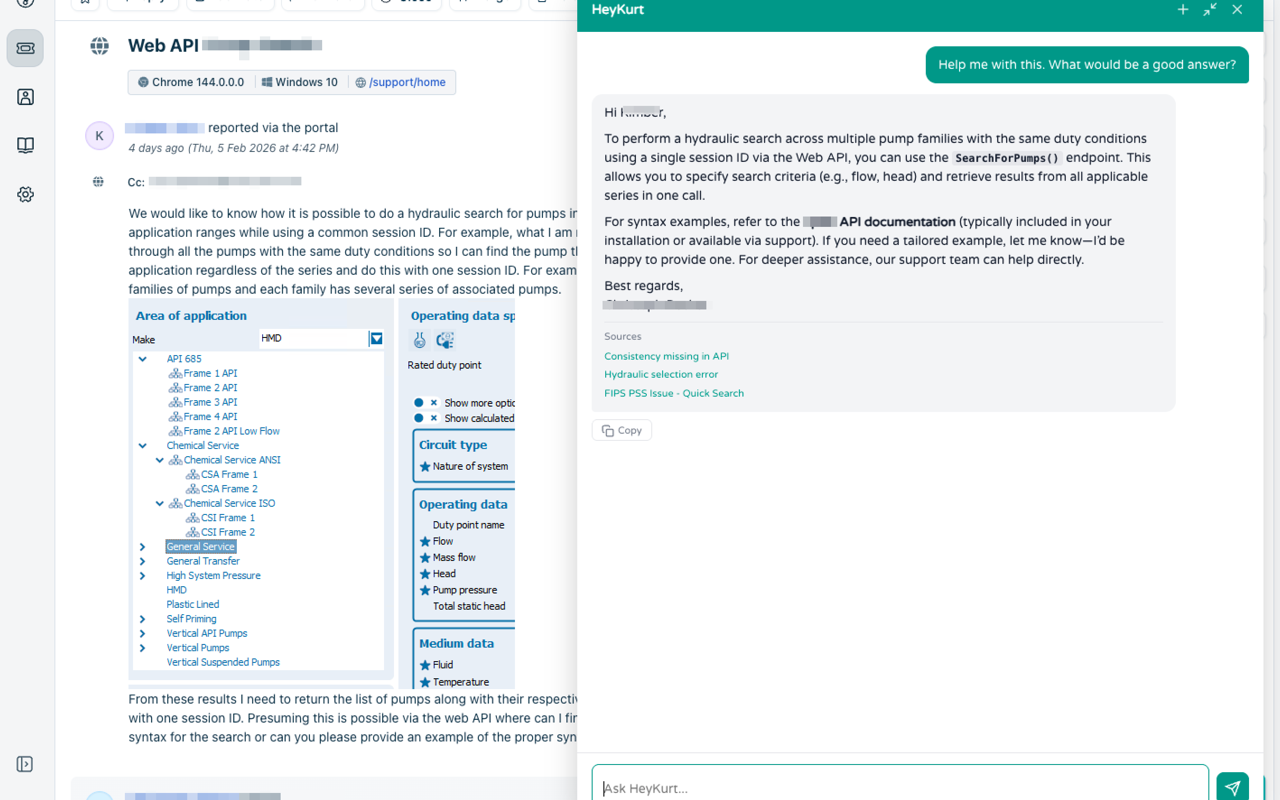
HeyKurt sits right inside your ticket system. Get AI-powered answers from your knowledge base without switching tabs.
Install and go
Install the extension
Install from the Chrome Web Store or download the ZIP. Works in Chrome and Edge.
Log in
Click the extension icon and log in with your HeyKurt username and password. That's it.
Answer with AI
Open any ticket – Kurt reads the context and suggests the perfect response.
Why agents love the extension
Instant Answers
AI reads the ticket and finds the answer in your knowledge base
Context-Aware
Understands the full ticket conversation, not just the last message
Works Everywhere
Freshdesk, Zoho Desk, and more – one extension for all platforms
Secure & Private
No data stored in the extension – everything stays on your HeyKurt account
Works with your ticket system
How to install
From the Chrome Web Store
The easiest way – install directly from the store. Works in Chrome and Edge.
Open Chrome Web StoreOr install manually
1. Download
Download the extension ZIP file below.
2. Unpack
Unzip the file to a folder on your computer.
3. Load in browser
In Chrome or Edge: go to Extensions → Manage Extensions, enable Developer mode, then click "Load unpacked" and select the folder.
4. Log in
Click the extension icon and log in with your HeyKurt username and password.
Requires a HeyKurt account. Try for free
Why HeyKurt?
Made in Germany
Developed and hosted in Germany
GDPR Compliant
Data never leaves the EU
Setup in Minutes
Install, connect, done
Personal Support
Real humans, no bots
Ready to speed up your support?
Start free today. No credit card required.
Try for free30 days free · No credit card · Cancel anytime